
Download Todoist – Task Manager, To-Do List, Productivity App
Overview
Todoist is a versatile task management tool designed to help individuals and teams stay organized, focused, and productive across multiple platforms. As a leading personal task manager, it caters to professionals, students, freelancers, and everyday users seeking a reliable system to track daily responsibilities, manage projects, and meet deadlines. The software supports seamless integration with web browsers, email clients like Gmail and Outlook, and native mobile applications for Android and iPhone, ensuring users can access their tasks from virtually any device.
With a strong emphasis on simplicity and usability, Todoist enables users to create, prioritize, and schedule tasks efficiently. It supports recurring tasks, sub-tasks, and project nesting, making it ideal for managing complex workflows. The application’s ability to convert incoming emails into actionable tasks streamlines task capture from communication channels. While the developer did not provide detailed background information, its recognition by TechCrunch, the New York Times, and Lifehacker highlights its credibility and widespread adoption.
Real-world use cases include managing workday to-dos, planning academic assignments, organizing personal goals, and coordinating team projects. The app’s cross-device synchronization ensures continuity, allowing users to start a task on a desktop and complete it on a mobile device. With over 5 million users, Todoist has established itself as a trusted solution for modern productivity needs.
Key Features & Capabilities
- Recurring Tasks: Easily set up repetitive tasks with built-in calendar integration, ideal for weekly meetings, monthly reports, or daily habits.
- Project Nesting & Sub-Tasks: Organize complex projects by creating hierarchical task structures, allowing users to break down large goals into manageable steps.
- Email Integration: Add tasks directly from Gmail or Outlook by forwarding emails, enabling quick capture of action items from correspondence.
- Multi-Platform Access: Use Todoist on desktop (Windows, Mac, Linux), mobile devices (Android, iPhone), web browsers, and Chrome Apps for uninterrupted workflow.
- Reminders & Notifications: Receive timely alerts via email or mobile text message (Premium feature) to stay on track with upcoming deadlines.
- Offline Support: Leverage HTML5-powered functionality to access and edit tasks without an internet connection, with changes syncing automatically when reconnected.
- Task Prioritization: Assign priority levels to tasks to focus on what matters most, enhancing decision-making and time management.
These features collectively enhance workflow efficiency by reducing task-switching, minimizing forgetfulness, and promoting consistent follow-through. For example, a freelancer can create a project for a client, break it into sub-tasks, set recurring check-ins, and receive reminders—all from a single interface. Similarly, a student can integrate course emails into their task list and schedule study sessions using recurring dates.
User Interface, Workflow & Performance
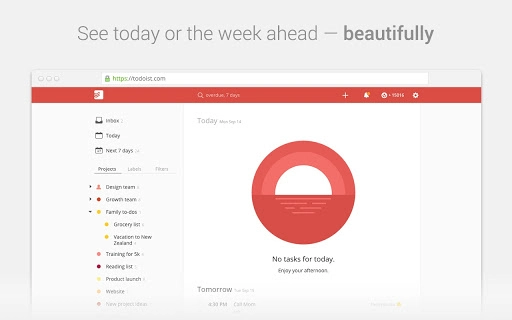
Todoist features a clean, minimalist user interface designed for intuitive navigation and rapid task input. The layout emphasizes clarity, with a sidebar for projects, a central task list, and a streamlined interface for adding and editing tasks. Users can quickly add tasks using natural language input (e.g., “Call Mom tomorrow at 5 PM”), which the app parses into structured entries.
Workflow efficiency is enhanced through keyboard shortcuts, drag-and-drop functionality, and customizable views. The application supports quick filtering by project, due date, or priority, allowing users to adapt their workspace based on current focus. While specific performance metrics were not provided, the software is described as leveraging HTML5 for smooth operation and responsive interactions.
Stability is maintained through regular updates and cloud-based synchronization. The developer did not specify resource usage details, but the application’s lightweight design and offline capabilities suggest efficient CPU and RAM handling. Performance observations are based on general software behavior patterns, indicating consistent responsiveness across devices.
Compatibility & System Requirements
Todoist is compatible with Windows, Mac, and Linux operating systems, offering native desktop applications for broad accessibility. The software supports web browsers and Chrome Apps, enabling use without installation on any device with internet access. The installation size is listed at 100 MB, which is modest for a full-featured task manager.
Exact system requirements were not listed. However, the application’s HTML5 foundation and cross-platform design imply compatibility with modern hardware and standard web browsers. Platform compatibility information is limited to the provided OS list, and no specific hardware specifications were shared.
Users can expect seamless functionality across desktop, mobile, and browser environments, with data syncing in real time. The app’s architecture supports offline use, ensuring usability even in low-connectivity scenarios.
Pros and Cons
Pros
- Intuitive, clean interface ideal for both beginners and advanced users
- Seamless cross-device synchronization across desktop, mobile, and web
- Powerful task organization with nesting, recurring tasks, and priority levels
- Direct email integration for quick task capture from Gmail and Outlook
- Offline support with automatic syncing upon reconnection
- Free version offers robust core functionality
Cons
- Premium features like reminders via SMS require a paid subscription
- Limited customization options in the free tier
- No detailed system requirements provided for optimal performance
- Advanced automation tools are only available in higher-tier plans
FAQ Section
Is Todoist available for Windows, Mac, and Linux?
Yes, Todoist offers native desktop applications for Windows, Mac, and Linux, ensuring full functionality across all three major operating systems.
Can I use Todoist offline?
Yes, Todoist supports offline mode through its HTML5-powered architecture. You can view and edit tasks without an internet connection, with changes syncing automatically when connectivity is restored.
Does Todoist integrate with email clients?
Yes, Todoist allows users to add tasks directly from Gmail and Outlook by forwarding emails. This feature enables efficient task capture from incoming correspondence.
Is Todoist free to use?
Yes, Todoist offers a free version with essential features including task creation, project organization, recurring tasks, and cross-device sync. Advanced features require a paid subscription.
How often are updates released?
Todoist regularly releases updates to improve performance, add new features, and enhance security. The latest version, 10.0.0, was released on March 15, 2024.
Final Thoughts + CTA
Todoist stands out as a comprehensive, user-friendly task management solution that delivers on its promise of simplicity and power. Its ability to unify task tracking across devices, integrate with email, and support recurring and nested tasks makes it an ideal choice for anyone aiming to boost productivity. While some advanced features are reserved for premium users, the free version remains highly functional for most personal and light professional use cases.
Whether you're a student managing assignments, a professional handling multiple projects, or a freelancer juggling client work, Todoist provides the tools to stay organized and on schedule. With a strong reputation, broad compatibility, and a clean interface, it continues to lead in the productivity software space.
Download Todoist now







